Skip to content
Restaurant software built in Pakistan اردو

Your restaurant, on autopilot.

Guests scan, order and pay from the table. The kitchen sees it at once. You see every branch, live.
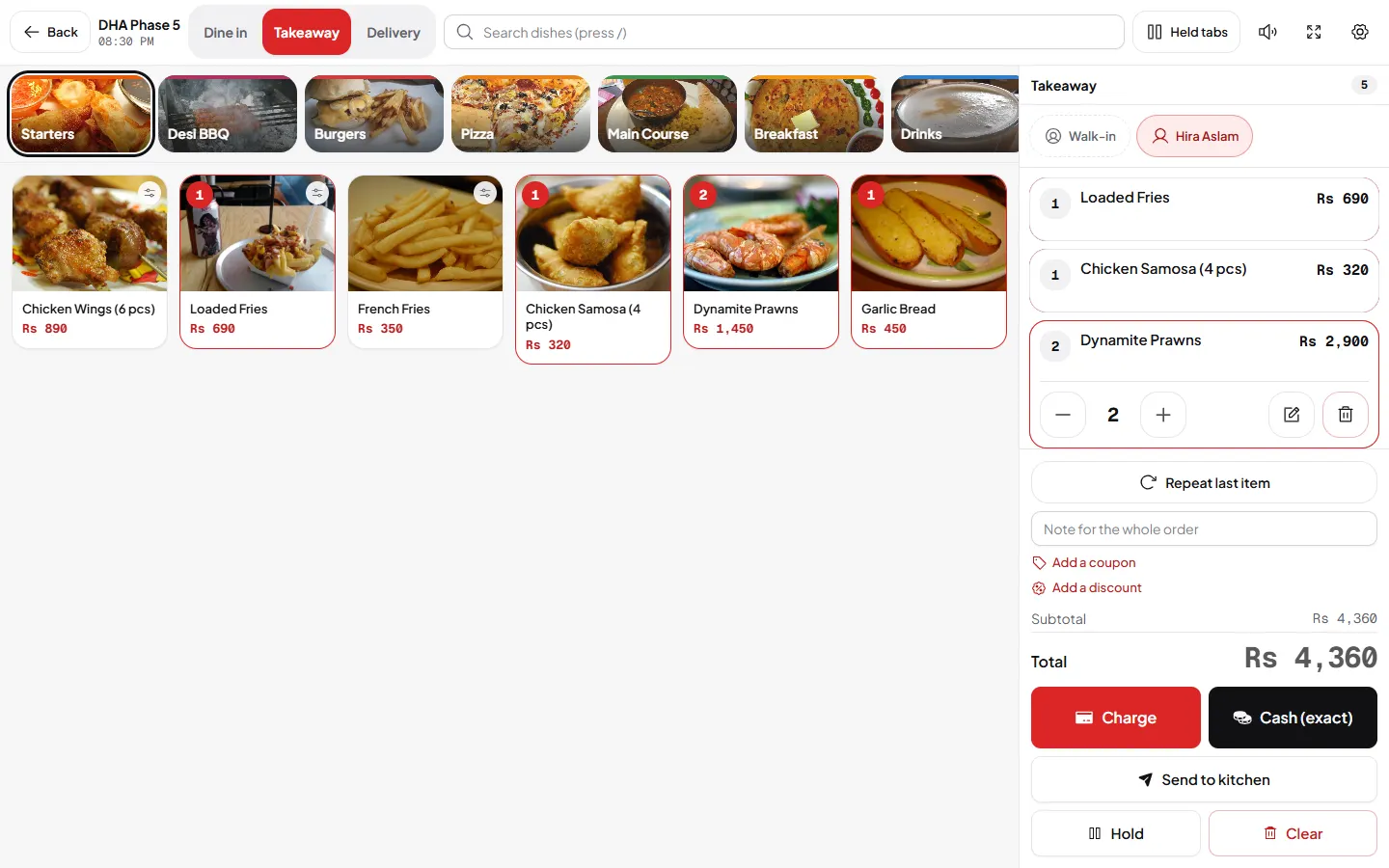
DishRoute take-order screen with food photos, categories and the cart
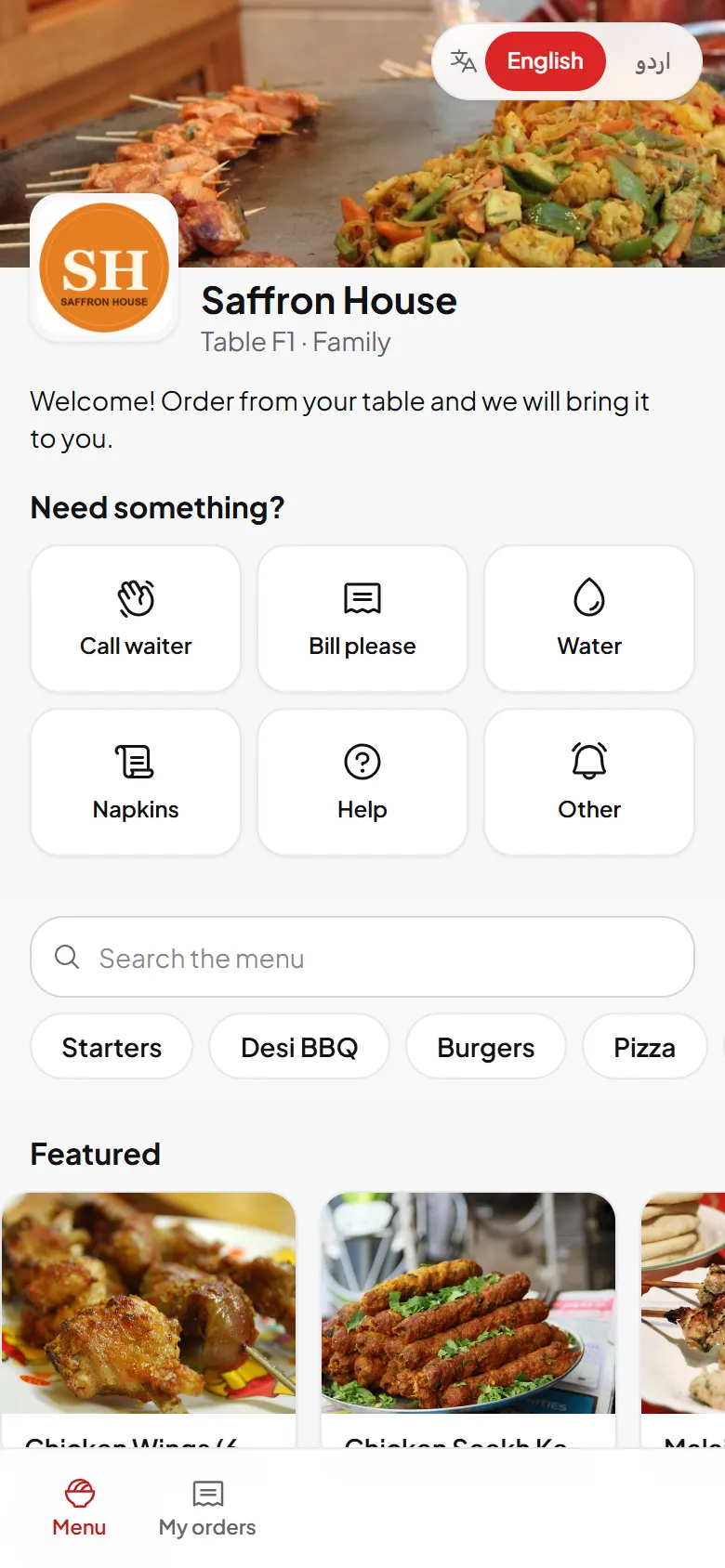
Guest QR menu on a phone with food photos and categories
  • Urdu and English on every screen
  • Guests order without an app
  • Any currency, tax and service charge
  • Keeps working on weak Wi-Fi
  • One account, every branch
Waiter floor map with occupied, ready and payment pending tables
About DishRoute

Built around the rush hour of a real restaurant

core areas that work as one loop
7
growth modules to switch on
10
order channels on one board
5
languages, chosen by each person
2

Table numbers, tokens, sizes and add-ons, cash and JazzCash, Urdu receipts. Every screen follows how a busy floor already works, so new staff learn it in one shift.

Learn more: About DishRoute: Restaurant Software from Lahore
Menu manager with categories, photos, prices and availability switches
Features

Everything service needs, in one place

Switch on only what your restaurant uses. Switching a module off never deletes its data.

One order flows everywhere

A guest orders once. The kitchen ticket, waiter alert, invoice and report follow on their own.

Sales by hour, day by day

See lunch, dinner and the late rush for every day of the week, per branch.

Sales this week
Rs 1.84M
Saturday so far

Rs thousand per shift. Sample data

The kitchen at a glance

New, preparing and ready orders with timers, so nothing waits too long.

Kitchen right nowGrill station
  • Preparing9
  • Ready3
  • New2

Tickets the kitchen can read

Every station gets its own ticket on screen or on 80 mm paper, with choices and notes.

A tour of the product

See DishRoute at work

Real screens from our demo restaurant on a busy Friday evening.

Counter

DishRoute take-order screen with food photos, categories and the cart
Payment panel with amount due, payment methods, tips and a keypad

Kitchen

Kitchen display with tickets, timers and all-day counts
Kitchen display in dark mode for the kitchen screen

Floor

Waiter floor map with occupied, ready and payment pending tables

Dashboard

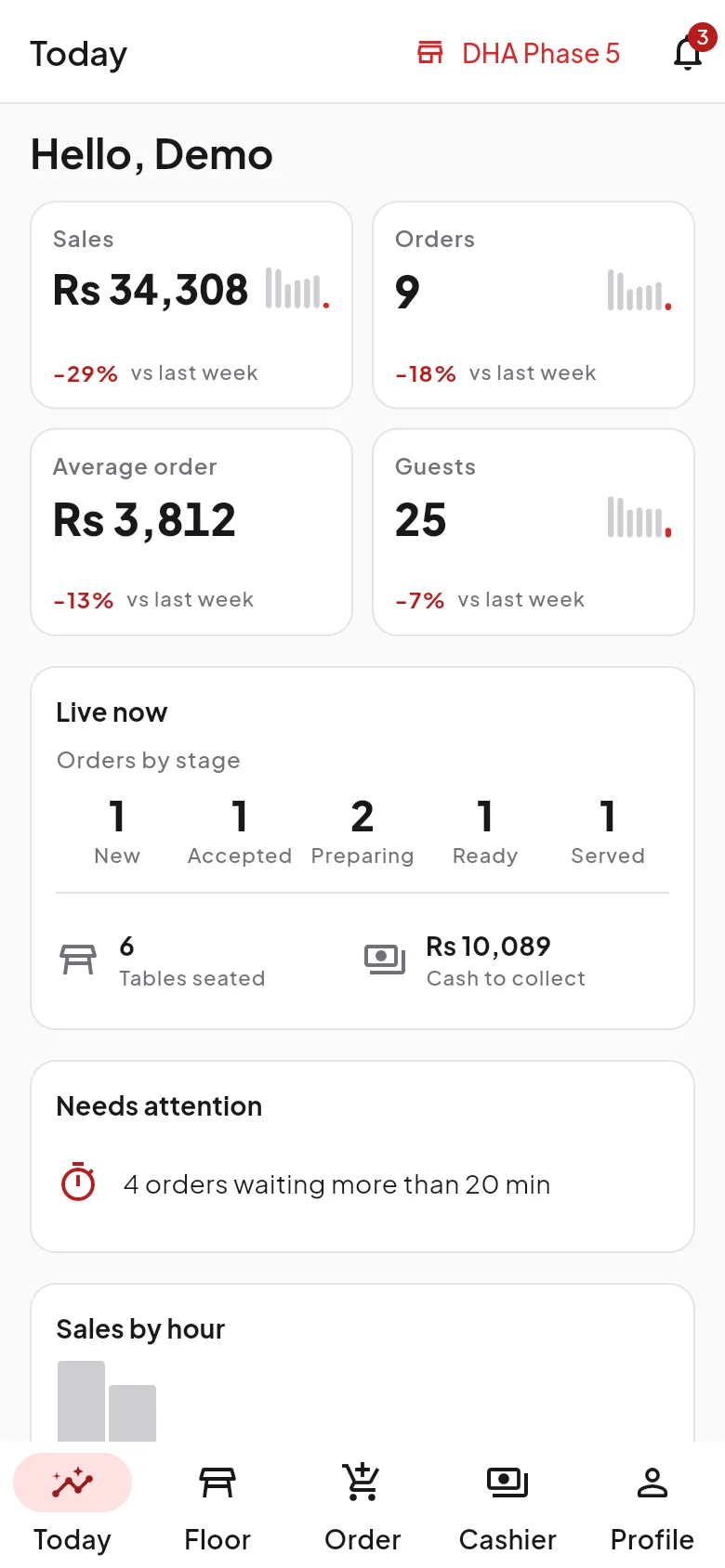
Owner dashboard with sales, orders and quick actions for today
Owner dashboard in dark mode with sales by hour and live orders

QR menu

Guest QR menu on a phone with food photos and categories
Guest order tracking on a phone, from received to served
Restaurant web store on a phone for takeaway and delivery

WhatsApp

WhatsApp inbox shared by the restaurant team
Marketing campaigns to guest segments

Reports

Sales overview with daily sales by branch
AI insights with orders by hour, best and slowest sellers

On the phone

DishRoute staff app Today screen with sales, orders, live order stages and what needs attention
DishRoute staff app floor map showing free, occupied, order ready and paying tables
DishRoute staff app order screen with dish photos, categories and a ticket bar
DishRoute staff app kitchen tickets with timers, notes and a Ready button
DishRoute staff app payment screen with cash, card, bank transfer and JazzCash or Easypaisa
DishRoute staff app notifications for ready orders, waiter calls and payments
How it works

From sign up to your first order in four steps

Most restaurants are ready the same day. Send us your menu if you want help with the first import.

Owner dashboard with sales, orders and quick actions for today

Step 1

Create your account

Pick a plan, choose your workspace handle and start a 14-day free trial. No card needed.

  • Your workspaceOne account for every branch, reached at dishroute.app.
  • Your settingsCurrency, tax, service charge and languages.
Menu manager with categories, photos, prices and availability switches

Step 2

Add your menu

Type it in, import a spreadsheet, or upload a photo of your paper menu and review what we read.

  • Sizes and add-onsHalf or full, extra raita, no onions.
  • Photos and tagsSpicy, popular, new, vegetarian.
Waiter floor map with occupied, ready and payment pending tables

Step 3

Print your table QR codes

One QR per table, as A4 sheets, table tents or stickers with your logo.

  • AreasHall, terrace, family, rooftop.
  • Live floorWaiters see every table by colour.
Kitchen display with tickets, timers and all-day counts

Step 4

Take orders

Guests scan and order. The board, kitchen and waiters see it at once, and the bill is one tap away.

  • Every channelQR, waiter, counter and WhatsApp.
  • No lost ordersRetries and a durable queue on weak Wi-Fi.
Daily service

The busy parts of the night, handled

The jobs that eat a manager's evening take a few taps.

  • Orders reach the right station
  • Sold-out dishes switch themselves off
  • Guests order again on WhatsApp
Hamza, WhatsApp

Salam! 2 biryani for pickup at 8, please.

Order #2041 confirmed

Ready at 8:00 PM. Track your order here.

Ready for pickup

Your order is ready at the counter.

WhatsApp ordering

Guests message your own number, get your menu and receive every update on WhatsApp.

Stock tonightGulberg branch
Live
Inventory with auto sold-out (Sample data)
Chicken biryani 42 OK
Lamb karahi 18 OK
Pistachio kheer 6 Low
Hot wings 0 Sold out
At zero a dish turns itself off on every menu.

Inventory with auto sold-out

Every order takes stock away. Guests never order a dish you cannot serve.

Tonight's floor

Bookings, seated tables and ready orders by area, so the host always knows where to seat the next party.

The QR menu on every phone

Your branded menu opens from the table QR in seconds. No app, no signup.

Guest QR menu on a phone with food photos and categories
Payments and invoices

Get paid any way your guests like

Every payment method, a clean invoice, books that add up.

  • Your gateway, your money: Connect Stripe, Safepay, PayFast, JazzCash, Easypaisa or a bank transfer method. Payments go straight to you.
  • Split and tip: Split by amount or by items, add tips, and take part payments on one bill.
  • Cash drawer: Open with a float, record cash in and out, close with counted against expected.
  • Digital invoices: A signed link to view, download as PDF or share. Print on A4, 80 mm or 58 mm.
Learn more: Payments and invoices
Cash drawer with opening cash, takings by method and expected cash
Reports

Numbers you can act on tonight

Know what sold, when, and where, without a spreadsheet.

  • Sales at a glance: Today, yesterday, this week, this month or any range, per branch or for all.
  • Best and worst sellers: Items and categories by quantity and revenue, including what did not sell.
  • Peak hours: A heatmap of orders by hour and weekday to plan staff and prep.
  • Payments and taxes: Cash against online, paid and unpaid, refunds, discounts, taxes and service charges.
Learn more: Reports
AI insights with orders by hour, best and slowest sellers

Screens your guests will love

The menu at the table, the order status and your own web store, all on the guest's phone.

QR menu
Guest QR menu on a phone with food photos and categories
Order status
Guest order tracking on a phone, from received to served
Web store
Restaurant web store on a phone for takeaway and delivery
Menu management

One menu, every screen, always current

Change a price or sell out a dish in one tap, everywhere at once.

  • Import, do not retype: Upload a spreadsheet or a photo of your paper menu. Review the batch, then publish.
  • Sizes and add-ons: Half or full, regular or large, with required and optional add-on groups and limits.
  • One-tap availability: Mark an item sold out from any screen. It returns when you switch it back on.
  • Schedules: Show breakfast from 7 to 11 or a lunch deal on weekdays only.
Learn more: Menu management
Menu manager with categories, photos, prices and availability switches
Who it is for

A screen for everyone on the floor

Each person sees only what their work needs.

Owners

Sales, payments and every branch live, without calling the manager.

Managers

The order board, menu, staff and the day's numbers on one screen.

Waiters

A live table map, call-waiter alerts and manual orders on any phone.

Kitchen

Tickets by station with timers, bump and recall on a big screen.

Guests

Scan, order and pay from the table, follow the order live, and order again on WhatsApp.

Every screen inEnglish and Urdu
Pricing

Simple pricing that grows with you

Start with a 14-day free trial. Pay monthly or yearly, in dollars or in rupees in Pakistan.

Prices for United States, in USD. Prices depend on where your restaurant is.

Starter

QR ordering for cafes and single restaurants

$ 19 / month

14-day free trial

Choose Starter
  • 1 branch
  • Up to 15 tables
  • 5 staff logins

Pro

Grow revenue on autopilot

$ 99 / month

14-day free trial

Choose Pro
  • Up to 10 branches
  • Unlimited tables
  • 75 staff logins

Enterprise

For chains and franchises

Custom

Unlimited branches, custom domain, the on-premise restaurant server, API keys, an SLA and a dedicated success manager.

Talk to sales

What each plan includes

Questions owners ask

Cannot find yours? Ask us and we answer within one working day.

All questions

How long does it take to go live?

Most restaurants are ready the same day. Create your account, add or import your menu, print your table QR codes and take your first order.

Do guests need to download an app?

No. Guests scan the QR on the table and your menu opens in their phone browser. No app, no signup and no login.

Can I import my existing menu?

Yes. Upload a spreadsheet, or a photo of your paper menu. We read the items and prices into a batch you review before anything is saved.

What happens when the internet is slow?

Orders are sent with retries and a unique key, so a weak connection never creates a lost or double order. Staff screens show their connection state and keep refreshing.

Which printers and screens work?

Any phone, tablet, laptop or smart TV with a modern browser. Kitchen tickets and receipts print on standard 80 mm and 58 mm thermal printers, invoices on A4.

Does it work with my currency and taxes?

Yes. Currency, tax inclusive or exclusive, service charge, rounding and tips are settings per restaurant. Plans are billed in USD, or in rupees in Pakistan.

Start today

Put your restaurant on autopilot tonight.

Set up your menu, print your QR codes and take your first order today. 14 days free, no card needed.