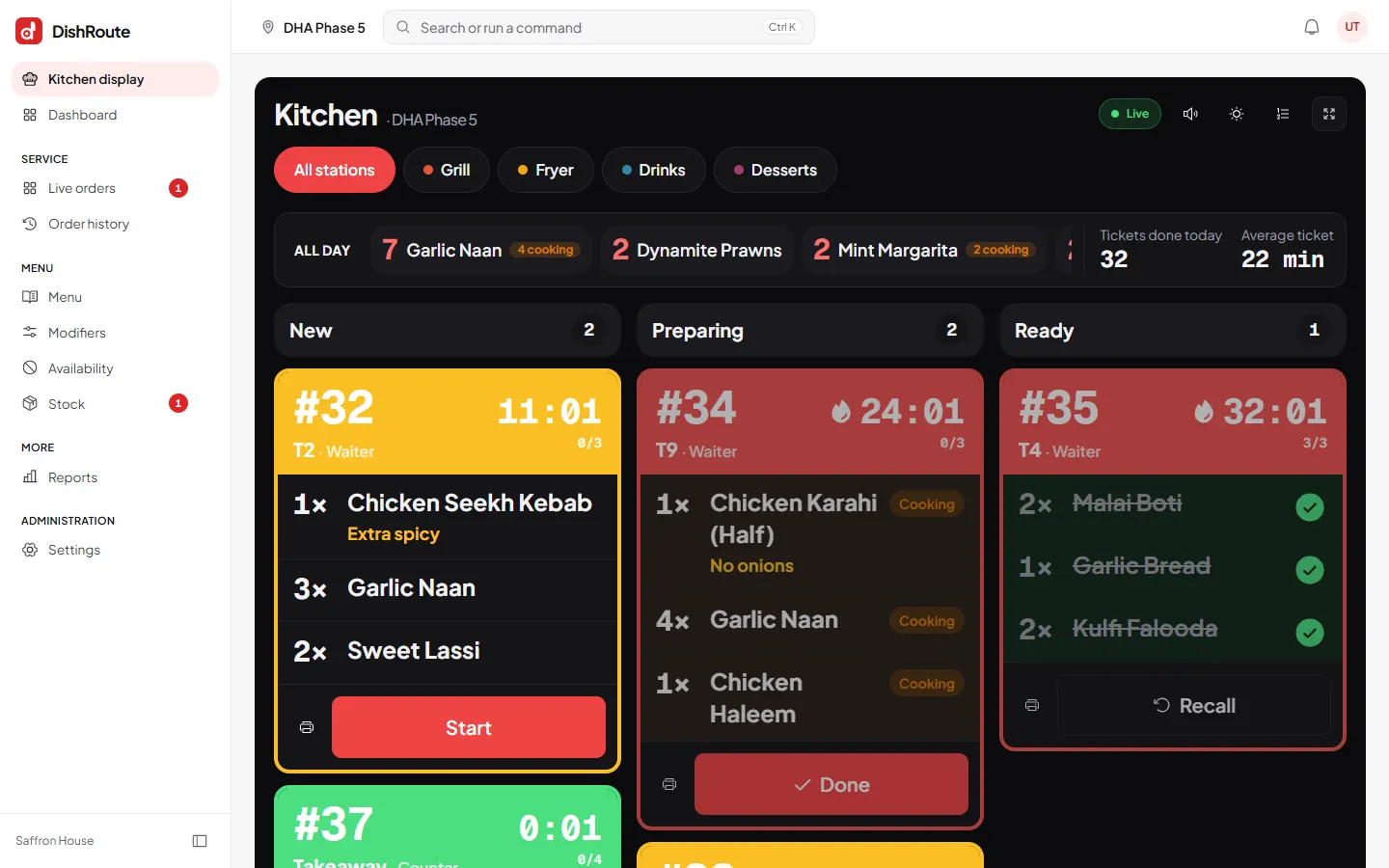
The kitchen display shows every ticket in three columns: New, Preparing and Ready. Late tickets turn red and show a timer.
Set up stations
Stations send each dish to the right screen.
- Open Settings and choose Kitchen display.
- Choose Add station. Give it a name such as Grill, a short key and a colour.
- Choose the ticket paper width if the station has a printer.
- Give items or categories the station key in the menu so their lines go to that screen.
Without stations every ticket shows on every kitchen screen.
Cook an order
- Open Kitchen display on the kitchen screen.
- Choose your station at the top, or All stations.
- Tap Start on a new ticket when you begin cooking.
- Tap Done when the whole ticket is ready. You can also tick single dishes as they finish.
- Watch the all-day counts in the bar above. They total how many of each dish are waiting, such as 7 Garlic Naan.
Recall a ticket
If a ticket is marked ready by mistake, tap Recall on it. It returns to Preparing.
Sound and full screen
Use the speaker icon to switch the new-ticket sound on or off and the corner icon for full screen. Tap the page once after opening so the browser allows sound.
Related
Was this page helpful?
Good to hear. Your answer is not sent or saved.
Sorry about that. Tell us what was missing and we will improve this guide. Tell us